Stage 1 – Installing the App on Your Shopify Store (Required)
To get started with Discount Depot App on your Shopify store, follow these simple instructions:
1. Login to your Shopify Store: Access your Shopify account by logging in with your credentials.
2. Visit the Discount Depot App page: Click here to visit the Discount Depot App page.
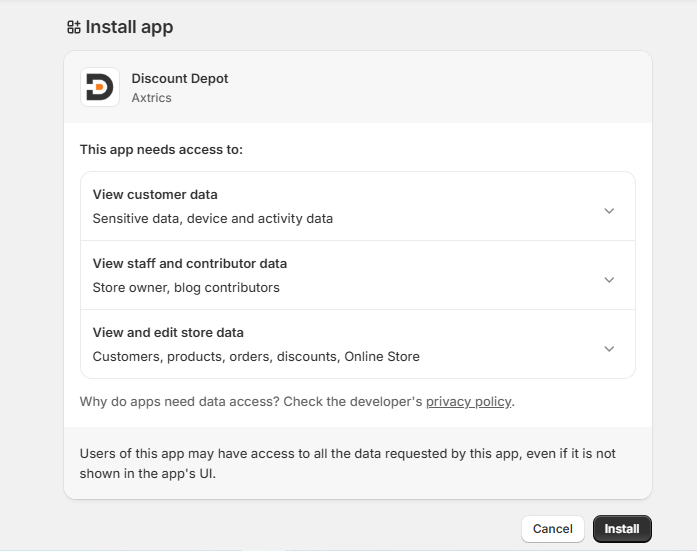
3. Click the “Install” button: On the Discount Depot app page, click the “Install” button to begin the installation. You will then be redirected to a confirmation screen (as shown below). Click “Install” again to complete the installation process.
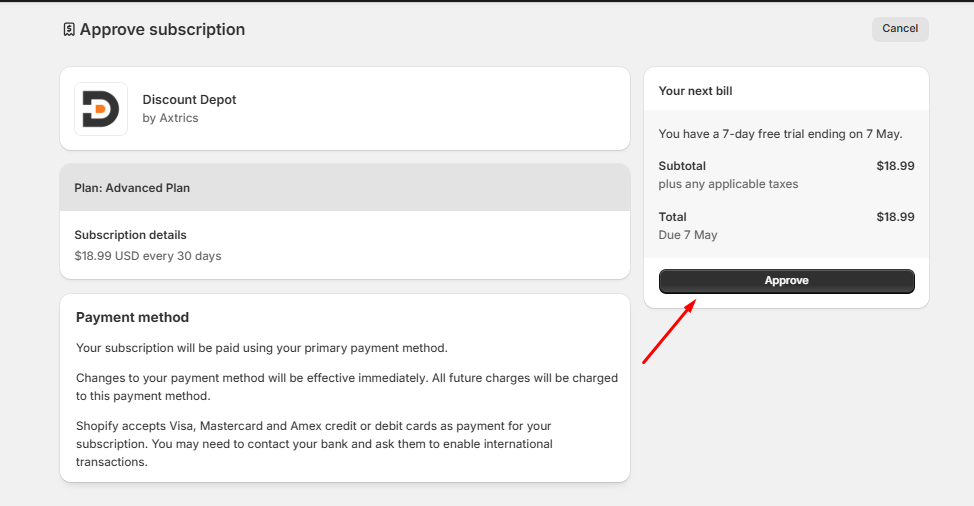
4. Approve the billing: You will be prompted to approve the billing details. Click the “Approve” button to proceed with the installation.
Following these steps will ensure that the Discount Depot App is successfully installed on your store, enabling you to begin creating your discount rules and taking advantage of its features.
Please note that while Stage 2 is not mandatory, we highly recommend completing it to unlock the full potential of the app. To learn more about the benefits of Stage 2 installation and for detailed instructions, click here. By completing both stages, you can maximize the benefits and capabilities of the Discount Depot App for your store.
Stage 2 – Enable the Discount Depot Core Script in your theme (Required)