The Customization feature in Discount Depot allows you to personalize the appearance and messaging of your storefront discount widgets. You can customize your Volume Discounts and Cart Goal Discounts to match your store branding and create a better shopping experience for your customers.
Important: Any customization changes you make will be reflected across all applicable discount widgets after saving.
Accessing the Customization Page
To access customization settings:
- Open the Discount Depot app from your Shopify admin.
- Navigate to Customization.
- Select the widget type you want to customize.
Volume Discount Customization
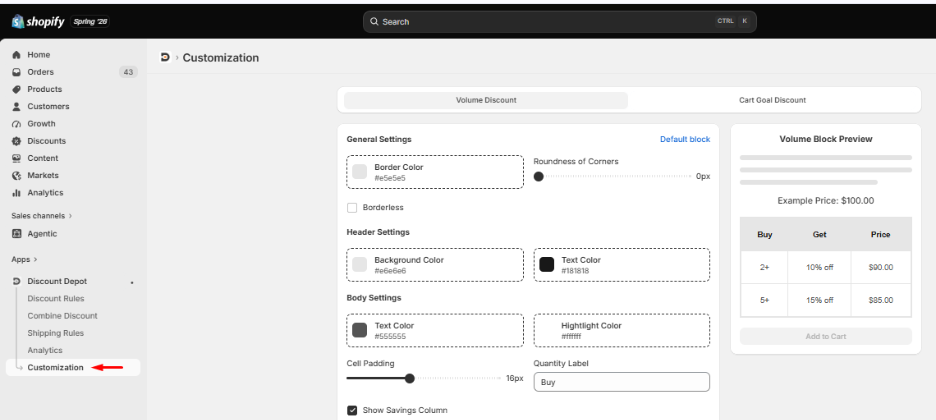
The Volume Discount customization feature allows you to fully personalize the appearance of your quantity discount tables displayed on product pages.
Using this section, you can:
- Customize the overall look and feel of the discount table.
- Change colors to match your store branding.
- Adjust borders, spacing, and corner styles.
- Modify the display text shown to customers.
- Show or hide specific information columns.
- Customize how selected discount offers are highlighted.
- Preview all changes in real-time before saving.
Cart Goal Discount Customization
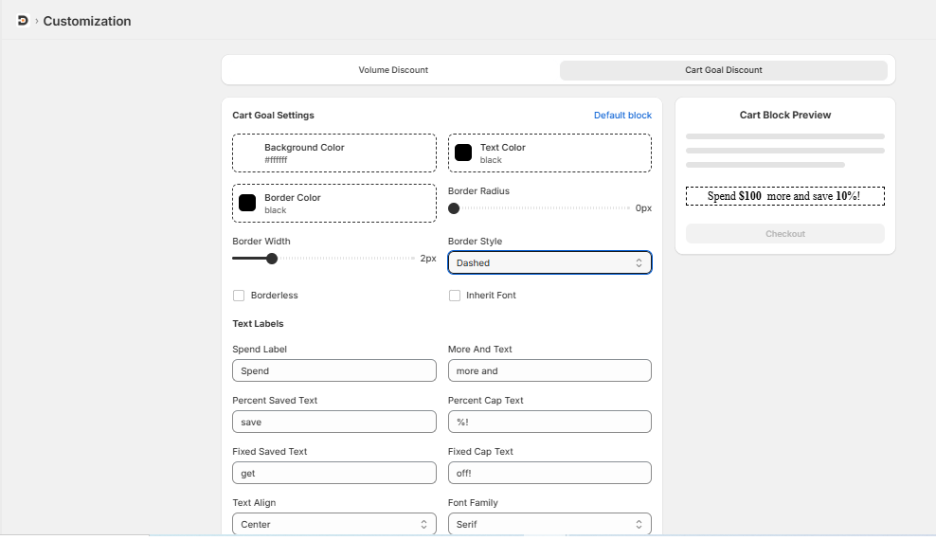
The Cart Goal Discount customization feature allows you to personalize your cart progress offers and promotional messages.
Using this section, you can:
- Customize the appearance of the cart goal banner.
- Modify promotional text displayed to customers.
- Change colors, borders, and typography.
- Adjust spacing and alignment.
- Match the cart goal widget with your store theme.
- Preview the final appearance before publishing.
Live Preview
The customization page includes a live preview panel that allows you to instantly see how your changes will appear on your storefront.
This helps you:
- Verify your branding.
- Test different styles and layouts.
- Ensure a consistent customer experience.
Saving Your Changes
After completing your customizations:
- Click Save.
- Review the changes on your storefront.
Your customized widgets will then be displayed to your customers.
Frequently Asked Questions (FAQ)
Yes. Volume Discounts and Cart Goal Discounts have their own independent customization settings.
Yes. The customization feature allows you to personalize the appearance of your discount widgets to match your store design.
Yes. A live preview is available so you can review your changes before saving.
Yes. The customization settings apply to all applicable widgets of the selected discount type.
Yes. You can return to the Customization page and update your settings at any time.