In case you have uninstalled the Discount Depot App and would like to remove any remaining code from your Shopify theme, please follow the steps below carefully or contact us to get it removed for you at support@discountdepot.axtrics.com
Important: Before making any changes to your theme code, we strongly recommend creating a backup of your current theme. You can do this by navigating to Online Store → Themes → Actions → Duplicate.
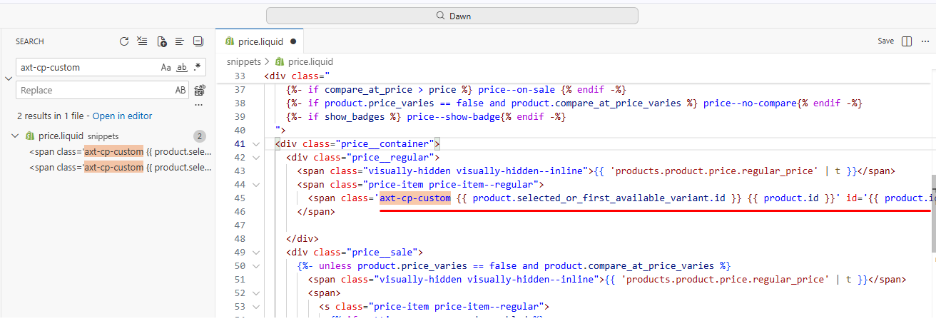
Step 1: Remove the axt-cp-custom Classes and Product Attributes
- From your Shopify admin, navigate to Online Store → Themes.
- Locate your active theme and click Actions → Edit code.
- Use the search bar and search for:
axt-cp-custom
- In every file where this class appears, remove the following:
- The axt-cp-custom class
- The product ID attribute
- The variant ID attribute
Example
Before:
<div
class=”axt-cp-custom {{ product.selected_or_first_available_variant.id }} {{ product.id }}”
id=”{{ product.id }}”
axt-cp-product-id=”{{ product.selected_or_first_available_variant.id }}”
>
After:
<div>
- Save all modified files.
Note: The axt-cp-custom class may exist in multiple files. Make sure to remove it from every occurrence.
Step 2: Remove the axt-cp-onclick-product Class
- In the Edit code section, search for:
axt-cp-onclick-product
- If this class exists in any file, remove it and save the file.
Step 3: Remove the axt-cp-keyup-product Class
- In the Edit code section, search for:
axt-cp-keyup-product
- If this class exists in any file, remove it and save the file.
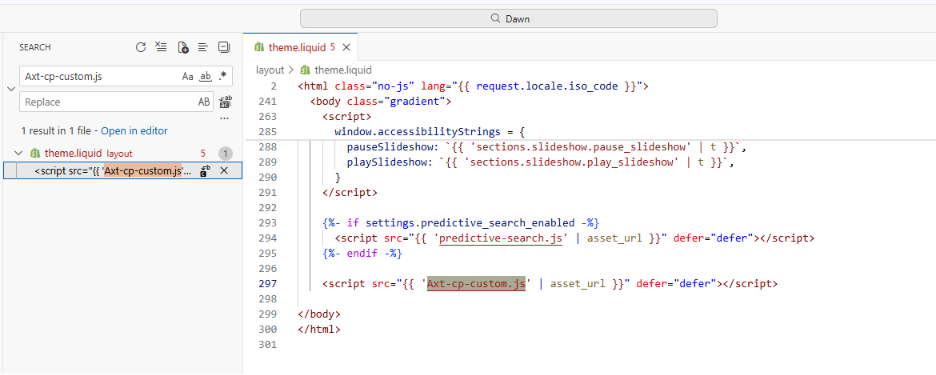
Step 4: Remove the Discount Depot JavaScript Include
- Open the theme.liquid file
- Search for the following script tag:
<script src=”{{ ‘Axt-cp-custom.js’ | asset_url }}” defer=”defer”></script>
- If the script exists, remove the entire line.
- Click Save.
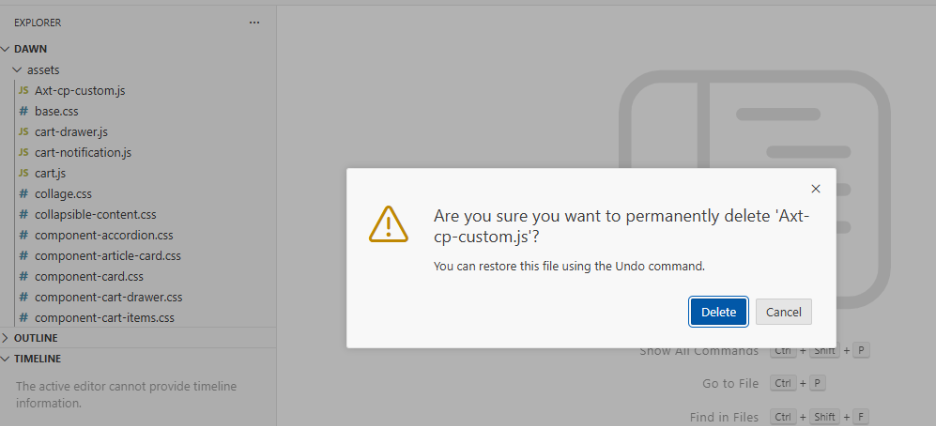
Step 5: Delete the Axt-cp-custom.js Asset File
- In the Edit code section, open the Assets folder.
- Search for the file:
Axt-cp-custom.js
- If the file exists:
- Click on the file.
- Select Delete file.
- Confirm the deletion.
Frequently Asked Questions (FAQ)
The leftover code generally won’t affect your store functionality, but removing unused code helps keep your theme clean and avoids loading unnecessary scripts.
Yes. Depending on your theme and app configuration, some of these classes or files may not exist. You only need to remove the items that are present in your theme.
Yes. We strongly recommend duplicating your theme before editing any code so you can restore it if needed.
No. The code listed in this guide is specific to Discount Depot’s custom theme integration and can be safely removed after uninstalling the app.
Try clearing your browser cache and verify that all instances of the classes, script tags, and asset files have been removed. If the issue persists, contact our support team for assistance.